
こんにちは、ミナピピン(@python_mllover)です。
今回はYoutubeの提供しているAPIを使用して、特定のワードでの検索結果と再生回数を取得し、そこに加えて高評価数とコメント数も一緒に取得していきたいと思います。
関連記事:【Python】YoutubeのAPIを叩いて色んな動画情報を取得してみる
特定のワードの検索結果を取得する
# ライブラリの読み込み 関数の定義
from apiclient.discovery import build
import pandas as pd

YOUTUBE_API_KEY = '自分のAPI鍵'
youtube = build('youtube', 'v3', developerKey=YOUTUBE_API_KEY)


def get_video_info(part, q, order, type, num):
    dic_list = []
    search_response = youtube.search().list(part=part,q=q,order=order,type=type)
    output = youtube.search().list(part=part,q=q,order=order,type=type).execute()

    #一度に5件しか取得できないため何度も繰り返して実行
    for i in range(num):
        dic_list = dic_list + output['items']
        search_response = youtube.search().list_next(search_response, output)
        output = search_response.execute()

    df = pd.DataFrame(dic_list)
    #各動画毎に一意のvideoIdを取得
    df1 = pd.DataFrame(list(df['id']))['videoId']
    #各動画毎に一意のvideoIdを取得必要な動画情報だけ取得
    df2 = pd.DataFrame(list(df['snippet']))[['channelTitle','publishedAt','channelId','title','description']]
    ddf = pd.concat([df1,df2], axis = 1)
    return ddf
関数を定義したら、実行してcsvに出力します。
# 関数を実行して結果をデータフレームに保存
df = get_video_info(part='snippet', q='鬼滅の刃', order='viewCount', type='video', num = 20)
これでデータは揃ったので、このデータを使用してコメント数・高評価数を取得していきます。
各動画ごとの高評価数とコメント数を取得する
def export_youtube_csv(search_word):
    # 処理を実行
    df = get_video_info(part='snippet', q=search_word, order='viewCount', type='video', num = 20)
    ldc_data = []
    # 再生回数を取得
    for i in df.videoId:
        statistics = youtube.videos().list(part = 'statistics', id = i).execute()['items'][0]['statistics']
        try:
            ldc_data.append([statistics['viewCount'], statistics['likeCount'], statistics['dislikeCount'],statistics['commentCount']])
        except:
            try:
                ldc_data.append([statistics['viewCount'], 0, 0, statistics['commentCount']])
            except:
                try:
                    ldc_data.append([statistics['viewCount'], statistics['likeCount'], statistics['dislikeCount'],0])
                except:
                    ldc_data.append([statistics['viewCount'], 0, 0, 0])
    # 再生数 高評価 低評価 コメント数を追加
    df_ldc = pd.DataFrame(ldc_data, columns=['view_count', 'good', 'bad', 'commnent_count'])
    # タイトル情報などと再生数などのデータフレームを結合
    df_concat = pd.concat([df, df_ldc], axis=1)
    return df_concat

df2 = export_youtube_csv('ウマ娘')
df2.head()
<実行結果>
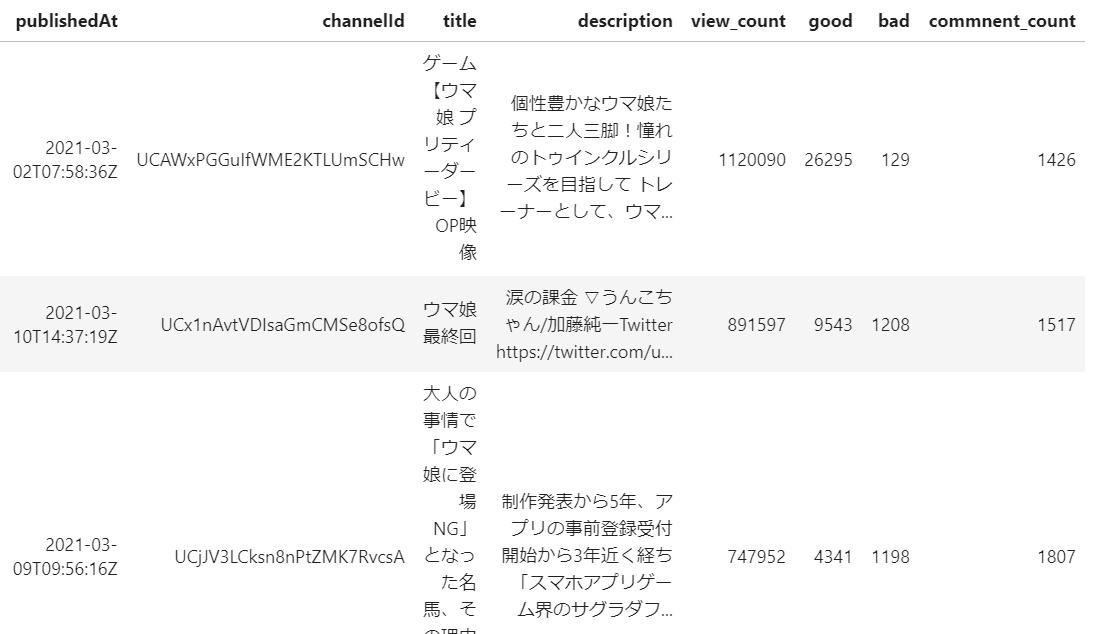
動画情報に高評価・低評価数・コメント数が取得されていることが分かります。
コメントの中身の取得についてはひと癖あったので、別の記事にまとめています。
では~


コメント
[…] 関連記事:【Python】Youtubeの再生数・コメント数・高評価数をスクレイピングで取得する […]
[…] 関連記事:【Python】Youtubeの再生数・コメント数・高評価数をスクレイピングで取得する […]
[…] 関連記事:【Python】Youtubeの再生数・コメント数・高評価数をスクレイピングで取得する […]
[…] 関連記事:【Python】Youtubeの再生数・コメント数・高評価数をスクレイピングで取得する […]
[…] 関連記事:【Python】Youtubeの再生数・コメント数・高評価数をスクレイピングで取得する […]